
Jin Lei, from Aofei Temple
Qbit | Public Account QbitAI
TRAE, just made a big move.
In the past, if you wanted to fix a bug, you had to open TraeCode; and if you needed to present a technical solution, then you had to use a "teleport step" and jump to TraeWork...
Now, there’s no need for such trouble.
Because they have officially undergone dual-side integration today, and have been upgraded into a new TRAE.
A highlight of the new TRAE is that it has both Agent mode and IDE mode.
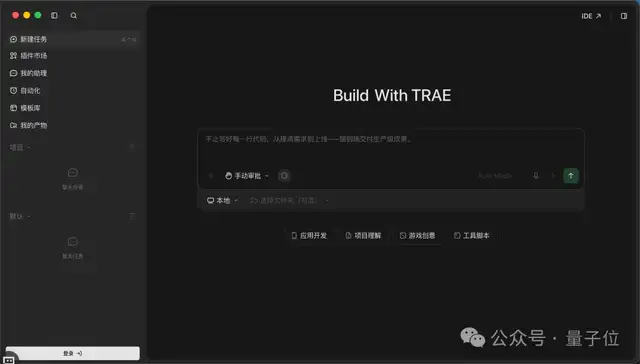
Among them, the Agent mode focuses on the global workbench. Everyone can manage projects in one window, assign different tasks to multiple Agents, and carry out coding, documentation, and material preparation all here.
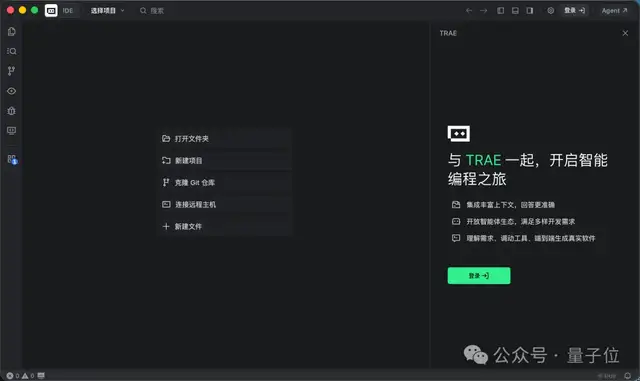
IDE mode still retains both SOLO and IDE gameplay styles. The switch between the two modes is located in the top-right corner; just click to transition.
For example, the 3D version of a pelican riding a bike that caused a stir in the entire AI community some time ago, the “how to open” method in the new TRAE can be like this.
We created three new tasks in the same project folder, and each Agent has its own role:
- Agent 1: Write the code to create the pelican, bicycle, and scene;
- Agent 2: During testing, open the page screenshot for inspection, and compile a list of issues;
- Agent 3: Fix the existing problems item by item according to the provided list.
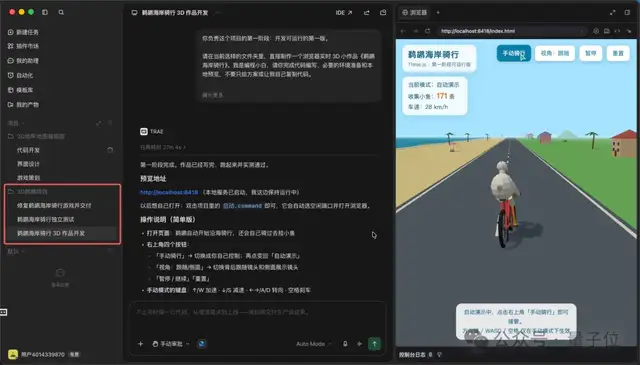
In the end, they worked together like a small team, creating a fully functional 3D version of a pelican bicycle.
So, this pelican completed the entire cycle of development, testing, repair, and delivery in the new TRAE just perfectly.
And during this period, all test reports, repair reports, delivery instructions, etc., are automatically saved in “My Outputs” in the new TRAE. Each output can also be shared directly with others.
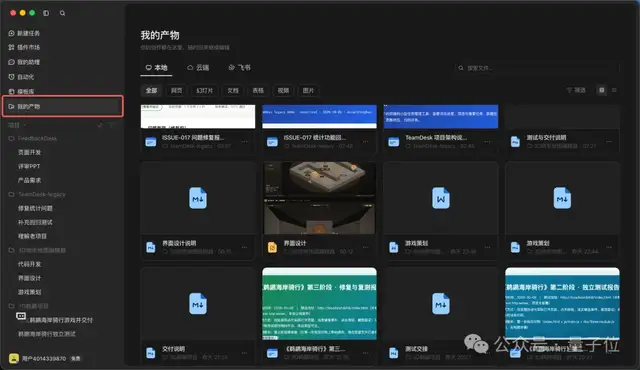
Clear and straightforward.
So, as a senior player in the AI Coding field, why did TRAE suddenly merge these two ends together?
For beginners and professional developers, what’s the difference between the new TRAE?
With these questions, let’s try to experience them through in-depth testing.
Even a beginner can create a game from a single idea
Let’s see if the new TRAE can enable a beginner who doesn’t know programming to turn their ideas into a game.
Coincidentally, Minecraft’s father Notch previously said that AI coding was bad, but later posted that he actually enjoyed it, and was creating a map editor for his dungeon game.
So, our first real test involved creating a 3D dungeon game with a self-building dungeon and walkable paths as a map editor.
This time, after creating the project in the new TRAE, we will start two tasks at the same time. One is responsible for writing the game planning, and the other is responsible for producing the interface design drafts:
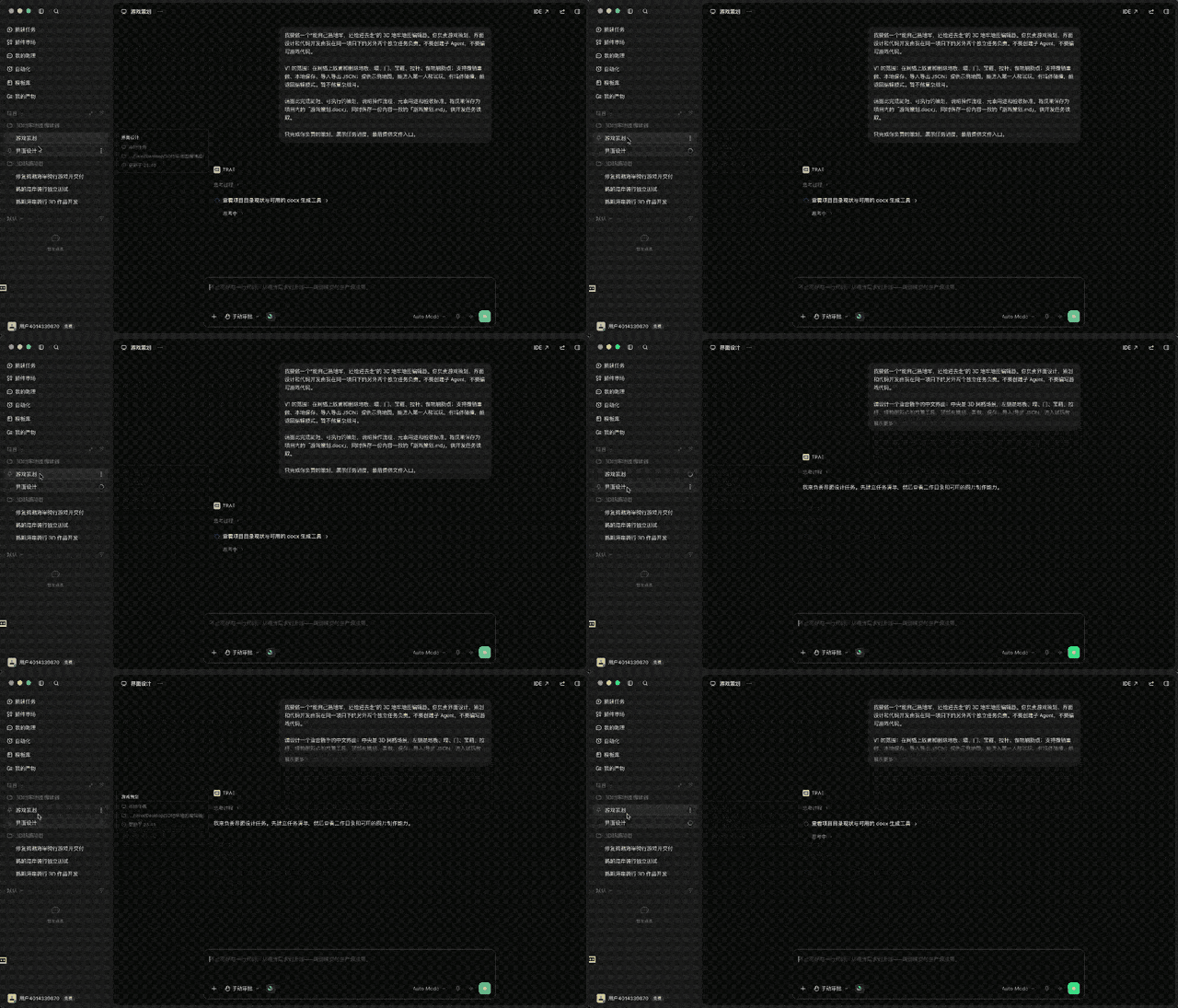
It can be seen that after we gave the instructions, the two Agents immediately started to focus on their own tasks.
It didn’t take long, and both results were submitted.
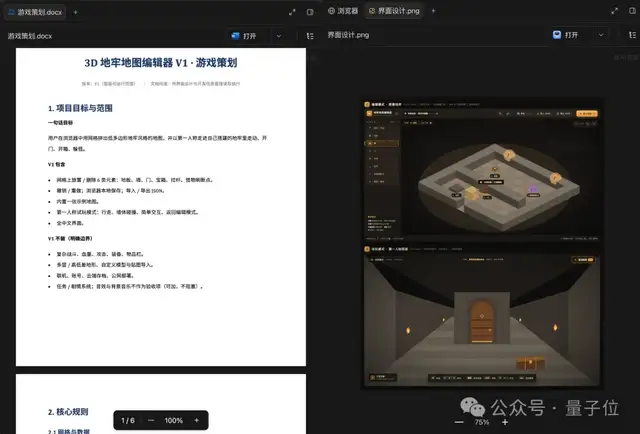
The plan agent handed over a Word version of the plan, along with a Markdown file that contains identical content. The operation process, the purpose of each element, and the acceptance criteria are all clearly written.
The design agent actually created a high-resolution design draft. Both the editing and first-person trial modes are presented in one interface, and the overall style follows a low-poly dungeon aesthetic:
Next, we will create a third task to allow it to read the results of planning and design, and start writing code.
However, in this step, there was a very real little incident. Since planning and design were carried out simultaneously, neither Agent could see the results of the other, so each wrote their own content.
For example, the grid in the design draft is 20×20, but in the planning document it is 32×32; for the shortcut keys of the erase tool, one has been set to E and the other to X; even for the monster refresh points, one says only 1 appears on the full image, while the other says 3 should be shown.
Fortunately, the Agent responsible for development read both files and, following the principle of “creating a simple version that can be played first”, made choices for each conflict, and wrote down the reasons in the delivery notes:
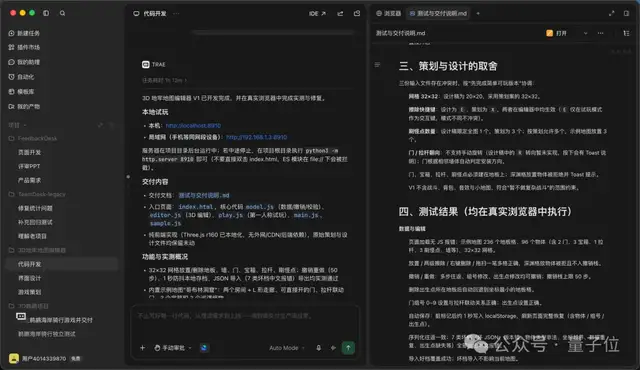
This also shows that with too many Agents, simply having different tasks is not enough; there must be a role that coordinates the whole situation.
After writing the code, the development Agent also opened a browser by itself and tested it. It fixed 6 issues in the process, such as a “Paused” window appearing as soon as it entered the trial mode, or the trial screen being too dark to even see the hallway.
The editor finally created allows you to easily place floors, walls, doors, chests, levers, and monster refresh points. Undo and redo, automatic saving, and JSON import/export are also fully available:
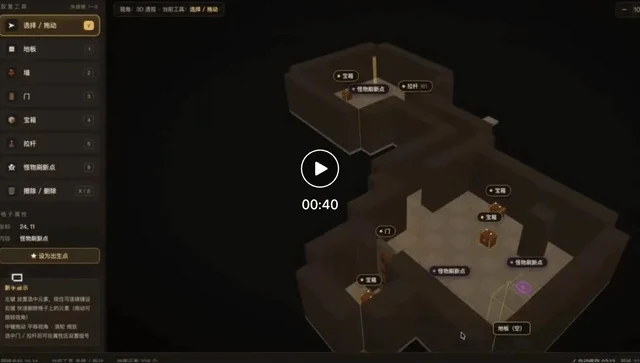
Video address:
https://mp.weixin.qq.com/s/tckIeqpzcq2jB11STQLTBg
It is worth mentioning that the new game that Notch is working on is called “Levers and Chests”.
These two things in our editor can be seen as a little tribute to him [solute].
Similarly, after this project is completed, the Word proposal, design drafts, design descriptions, and test delivery instructions, etc., are all neatly stored in “My Products”.
This used to have to be placed in the past; these outputs were either buried in chat records or scattered across various folders. Now, by opening a page, you can find them, and if you want to make further changes, you can open it back at any time.
So what if we need to modify the specific details?
One-click switch to IDE mode, let’s take a look.
After switching to IDE mode in the upper right corner, simply type in the dialog box:
Adjust the speed of the first-person walking to 70%.
After a few seconds, it reduced the walking speed from 3.4 meters per second to 2.4 meters per second, and the running speed was also lowered synchronously:
In simple terms, we can let the AI do complex development in Agent mode usually. When it comes to detailed work, we return to the IDE and review each line by line. Both modes have their own advantages.
Works well in real work too
Playing games is certainly fun, but for professional developers, what they care more about might be whether the new TRAE can handle daily work.
So in the next actual test, we’ll focus on a task that programmers often face problems with—Take over old projects。
For this purpose, we have prepared a mock project called TeamDesk. It is a small task management web page with about 20 files, and all the data is fictional. The project also includes a problem list.
This time, we directly created three new tasks in the project, allowing the three Agents to start working simultaneously:
- Agent 1: Read the code, understand the project, and prepare an architecture description for new employees.
- Agent 2: Only responsible for fixing bugs; no access to test files;
- Agent 3: Only responsible for complementary regression testing; no access to business code.
The architecture description provided by Agent 1 is a web page report that explains in simple terms which layers the project is divided into, how operations on the pages will change the data, and where the data actually resides in the browser.
The Agent 2 responsible for fixing bugs first reproduced the issue according to the problem list. After finding the cause, only one line of code was changed, and a condition was added to the statistics to exclude archived tasks:
Finally, after completing the regression testing, Agent 3 presented the final result:
Afterwards, we checked the original code again, and all three Agents faithfully carried out their respective responsibilities. Only one line of the business code was changed, and there was also a new file in the testing folder.
For such regression testing, it can actually be handed over to the automation feature of the new TRAE in daily life. For example, you can set it to run automatically every morning, and it will remind you when issues are found. Those interested can try it out themselves:
Let’s look at another scenario closer to daily life: one person delivers a complete iteration.
This time, the task we set for ourselves is to create a feedback processing platform called FeedbackDesk, and present it at the internal review meeting. The materials needed for the review include a product requirement document, a operable web demo, and a review PPT.
Similarly, we also created three new tasks in one go:
- Agent 1: Write the product requirement document;
- Agent 2: Create a web page Demo;
- Agent 3: Prepare the PPT for the review.
Before long, the three Agents submitted their respective results: a 4-page Word requirement document, a web page that can be operated directly in a browser, a 6-page review PPT, and supporting lecture notes.
Previously, we had to go to TraeWork when writing requirement documents and making PPTs, and back to TraeCode when creating web pages. Now, in the same window, a group of Agents can carry out all these tasks simultaneously.
Moreover, it’s even more convenient that the new TRAE also provides a template library. For tasks like document work of this kind, we can even directly use a template to get started:
There’s an even easier way.
Even if you are not in TRAE, now that you have bound Feishu or WeChat, just @TRAE directly, and it will work cross-platform; and on mobile devices is also synchronized too:
Convenient, it’s really convenient.
Why combine two things into one?
Finally, let’s return to the initial question. As a senior player in the AI Coding field, why does TRAE combine the two endpoints together?
After several rounds of actual testing, our biggest realization is that writing code is actually just one part of development.
A project goes from idea to delivery. At the beginning, it involves breaking down requirements, writing plans, and creating designs. Later on, it requires testing, fixing bugs, and preparing reports.
Previously, these steps were split between two tools, the context was broken at two places, and the output was scattered in two places. People could only move back and forth by “flicking around”.
And what new TRAE has done this time is to connect this link together, turning it into a full-link development platform.
From a vertical perspective, from requirement breakdown to delivery, documents, design, code, and testing can all be placed in the same project. Repetitive processes can be automated, and desktop, web, and mobile versions remain synchronized.
From a horizontal perspective, a workbench manages all projects. Multiple Agents can progress concurrently, and which task gets stuck at which step can be seen immediately in the left sidebar. When deep code changes are truly needed, just switch back to the IDE with one click.
Looking overseas, it is not just TRAE that is doing this.
In April this year, Cursor launched Cursor 3, which includes an Agents Window specifically for managing Agents. Meanwhile, the classic IDE interface is retained, and both interfaces can be switched between at any time. Claude Code also introduced an Agent View, allowing multiple background Agents to be started, managed, and monitored in one panel.
It can be seen that leading AI programming tools overseas are combining “manage Agent” and “edit code” into a single tool.
However, actual testing also showed us that with more Agents, things do not improve automatically. Take the pelican at the beginning for example: the Agent in charge of development was confident when completing the task, saying that it had been tested in a browser twice and everything was normal; but once the Agent in charge of testing started working, it identified 4 issues, including the direction keys being reversed—when pressing the right-click button, the pelican moved to the left instead.
Plus the different opinions from the planning and design sections in the dungeon editor, and the three identical outputs from the feedback processing station, so the pattern is actually very clear.
In the end, what people need to do has changed. Now, we spend more time clarifying the tasks, preparing a common basis for the Agent, and arranging who will do the work and who will check it.
This may also be the issue that the new TRAE upgrade aims to solve.
After all, TRAE is already a seasoned player in the field of AI Coding. This time, by combining two tools into one, it aims to provide a single workbench that covers every aspect of development, thereby serving more developers who want to create things themselves.
From having an Agent write code for you, to directing a group of Agents from idea to delivery, AI Coding has officially entered a new stage in Agent development.
As for that “flicker step” that switches back and forth, it will probably not be used anymore in the future.