
IT Home On October 17, this morning, DeepSeek saw several continuous changes at the API level.
First, DeepSeek officially announced that the Search / Fetch API has been launched. Both interfaces use DeepSeek’s self-developed search engine to provide real-time web content for Agent and RAG applications.
The Search interface searches web pages by query and returns structured results, while the Fetch interface scrapes a single web page and returns titles and text in Markdown format. Both are raw JSON APIs with a Base URL of api.deepseek.com, using the same Bearer authentication as the DeepSeek API.
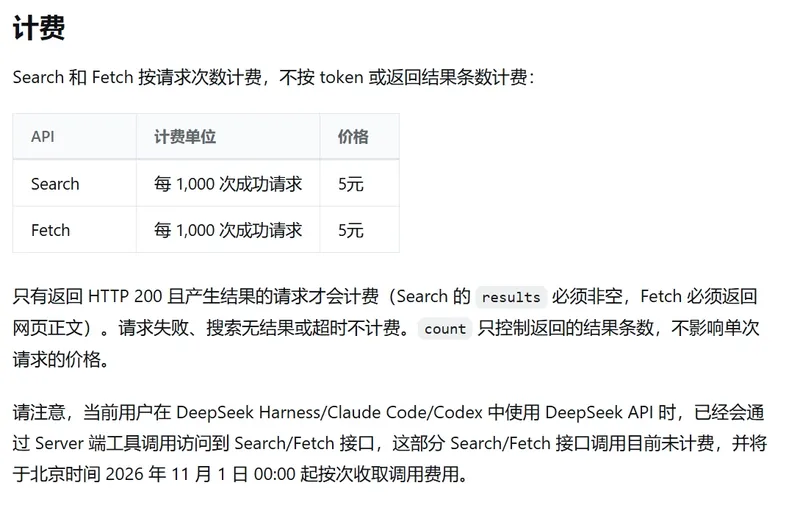
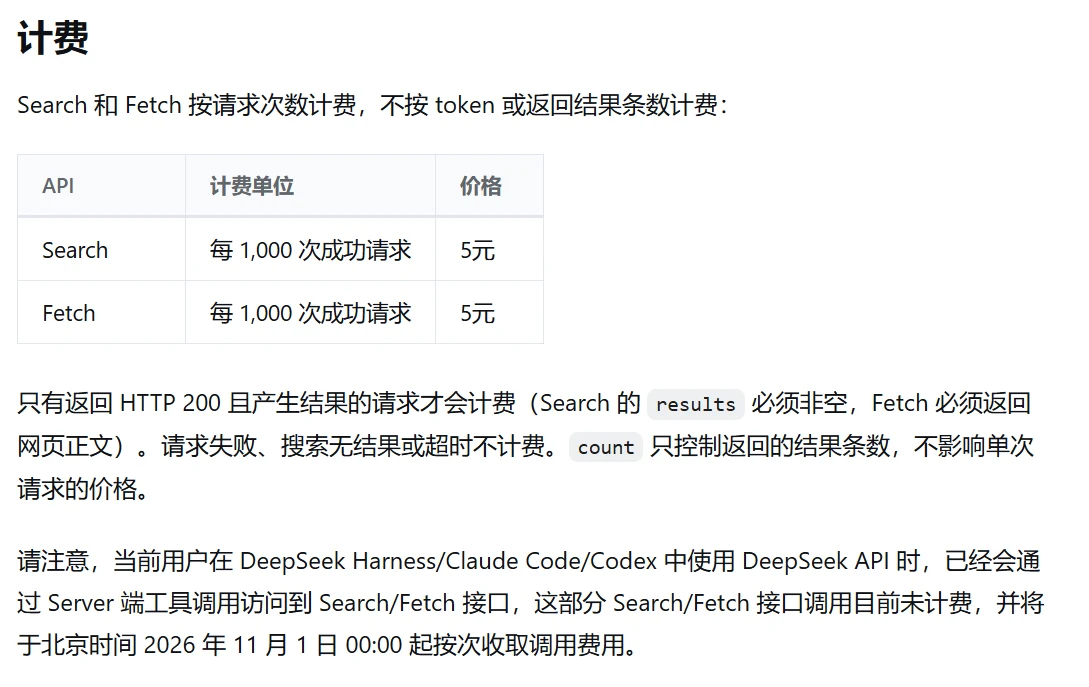
According to the DeepSeek support documentation, both Search and Fetch are charged based on the number of successful requests. The cost is 5 yuan per thousand requests. Charges are incurred only when Search returns a non-empty result list, Fetch returns the page content, and the HTTP status code is 200. Failed requests, empty results, and timeouts are not charged. The number of result items in a request does not affect the price.
Under each account, the Search and Fetch functions are each limited to 5 queries per second. Both are counted independently. Fetch also has an additional limit based on domain name, and HTTP 429 is returned if the limit is exceeded. The maximum number of query characters for Search requests is 128 characters. The number of returned results can be selected between 1 and 50; the default is 10. The results include a title, URL, summary, a longer summary for models, optional full text, publication date, reordering score, and authority rating.
It is worth noting that during the first two weeks after the Search API went live (before November 1, 2026), searches triggered through the Web Search tool in Claude Code or the web_search function in Codex were free of the Search fee.
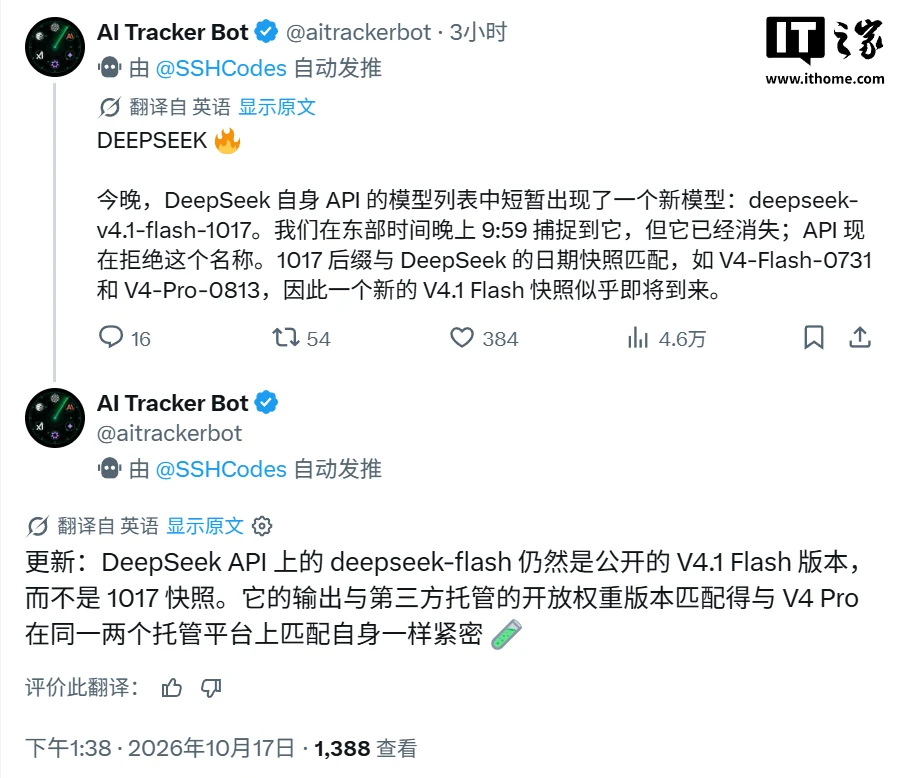
At the model level, the robot account AI Tracker Bot on the X platform captured an API entry labeled “deepseek-v4.1-flash-1017” in the DeepSeek official API list, but it was quickly removed.
The account indicates that the 1017 suffix is consistent with the previous date snapshot naming style of DeepSeek, such as V4-Flash-0731 and V4-Pro-0813, so it may refer to a new V4.1 Flash snapshot.
The account also updated that the deepseek-flash exposed on the DeepSeek API is still V4.1 Flash, not a 1017 snapshot; the degree of match between its output and models with the same open weight hosted by third parties is comparable to the consistency between V4 Pro across two hosting providers. As of the time of publication, DeepSeek has not provided any explanation regarding the existence or changes of the “1017” snapshot.
As a background, DeepSeek officially released V4.1 Flash on September 10. This is the smallest model in its new model structure series, and it natively supports multi-modal visual understanding. The model name can be changed to deepseek-flash to use it. The previous generation, V4 Flash and V4 Flash Vision Exp, has been discontinued and temporarily routed to V4.1 Flash.
Finally, DeepSeek also released the latest v0.2.1-rc1 version of DeepSeek Harness today. This is also the first candidate version of the 0.2.1 series, which consolidates the major changes related to users and developers since v0.2.0-rc.2. IT Home has summarized the new features as follows:
Allows users to discover and install plugins from the “custom plugin index source”.
The plugin management page has added a "Let the Agent Create Plugins" entry, which allows keeping drafts in the creation mode; execution begins only after sending a request.
Supports synchronization of dependencies for plugin enablement, disablement, uninstallation, and updates; when hot reload is enabled, replaced plugins that are updated or reinstalled take effect directly, and no restart is required when hot reload is not available.
Optional plugins support a minimal mode. The Official plugin list allows installation of the Claude Code and Codex combination packages corresponding to the current release version as needed, and can be used for headless, SDK, and ACP profiles.
New Session status recording interface for experimental plugins, allowing plugins to write and read their own session records.
New experimental Claude Code Mods compatibility layer. The main goal at this stage is to verify that the Claude Code Mods API features are roughly a subset of the DeepSeek Harness plugin, rather than providing actual full compatibility for users.
A new experimental developer tool bundle has been added, providing raw session logs, chat groups and bidirectional positioning of the main text, as well as embedded NodeJS debugging tools; the embedded DevTools currently use an English interface.
New experimental thinking process machine translation plugin can be enabled on the plugin page, with options for Bing, Google, or the paid DeepSeek Flash.
A new experimental Git Worktrees plugin has been added. It can be enabled on the plugin page. It is created by the Agent and enters an independent Git checkout.
The custom model API supports configuring the inference level of each model through the UI, without the need for manual file modifications.
Pi-AI routing supports processing session prompt updates based on model capabilities, as well as the dynamic addition and removal of tools.
The minimal mode supports reading images and automatically compressing long conversations. On the web and desktop, the context can be manually compressed using the /compact command.
Global commands support reading AGENTS.md from the shared agents directory, which can be specified via DSH_AGENTS_HOME.
Added a `working_directory` tool, and provided an interface for reading and switching session working directories for the TypeScript / Python SDK.
When SSH introduces a new independent executable helper runtime, it supports remote file operations, processes, terminals, sandboxes, and Node PTC.
The web version supports logging in with a DeepSeek account when accessing via local HTTP.
Supports identifying keys and tokens in sent messages, and hides them by default for on-demand viewing.
New sessions support pre-filled prompts for unsent messages; files, directories, and session references are preserved when restoring a draft or switching work areas.
New work step: Hide timing setting. You can choose to hide it after the response is completed, or when the next normal message arrives.
The Markdown file preview displays the YAML header metadata as a clear list of fields.
Related Reading: